




 SAEAUT SMS Server
Senden und Empfangen von SMS aus verschiedenen Anwendungen

Dieses Dokument ist auch als PDF verfügbar.

Aktuelle Version im Überblick:

SAEAUT SMS Server ist eine Anwendung, die der anderen Client-Anwendungen das Senden und Empfangen von SMS-Nachrichten ermöglicht.
SAEAUT SMS Server ermöglicht:
- Senden und Empfangen von SMS-Nachrichten über Geräte mit einem GSM-Modem
- Zusammenarbeit mit anderen Anwendungen über gemeinsam benutzte Datenbankdatei
Es ist eine Anwendung mit Benutzeroberfläche (UI) zur Einstellung der Kommunikationsparameter, Telefonnummern, Benutzergruppen, Protokollierung der Aktivitäten. (Wenn würden Sie bevorzugen eine Anwendung mit gleichermaßen Funktionalität ohne Benutzeroberfläche, versuchen Sie, bitte, unsere Produkte SAEAUT SMS Server Professional oder SAEAUT SMS Service die als Windows NT Service ohne UI implementiert sind und unabhängige Konfigurationsprogramm mit UI benutzen.
Haupteigenschaften:- Erstellung von Ereignis-und Benutzer-Struktur, die eine SMS-Nachricht erhalten soll
- Senden von SMS-Nachricht, die von der Client-Anwendung erstellt wurde
- Senden von SMS-Nachricht basierend auf das Ereignis
- Empfangen und Verarbeitung von SMS-Nachrichten
- Anzeigen von Berichten über gesendeten / empfangenen SMS-Nachrichten
- es nutzt PDU für die Nachrichtenübertragung an das GSM-Modem
- Es ist mit mehr Arten von GSM-Modems und GSM-Dienste-Anbieter getestet
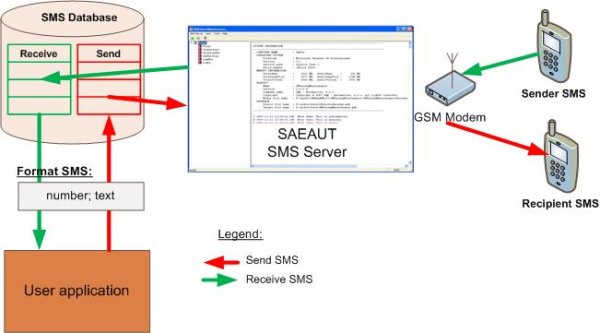
Abbildung 1: Zusammenarbeit SMS Server zu einer anderen Anwendung über gemeinsame Datenbank
Es kann verwendet werden:
- bei unserem Beispiel Desktop-Client-Anwendung für die einfache SMS von Ihrem Computer oder einem anderen Computer im LAN
- bei unserem Beispiel Web-Client-Anwendung für das Schreiben von SMS im Web-Browser
- Ihre Client-Anwendung
- mit einer anderen unserer Anwendung OpcDbGateway für komplexe Bedingung Messaging
SMS an definierte Gruppe von Emfangern
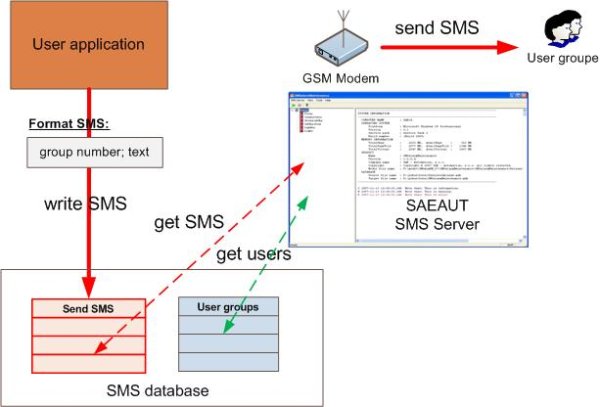
Abbildung 2: Verfahren zum Senden von SMS an definierte Benutzergruppe
Verfahren zum Senden von SMS an definierte Benutzergruppe
- User-Anwendung fügt einen neuen Datensatz in Datenbank für das Senden von SMS im Format definiert: Gruppennummer, text.
- Wenn SMS Server erkennt, dass die Tabelle ein neuer Datensatz in der Tabelle user Gruppen war wählt eine Liste der Benutzer, die zu dieser Gruppe gehören.
- Eine SMS-Nachricht wird auf der Grundlage der abgerufenen Daten erstellt und an jeden der Benutzer über angeschlossene GSM-Modem gesendet.
Senden von SMS an eine bestimmte Telefonnummer
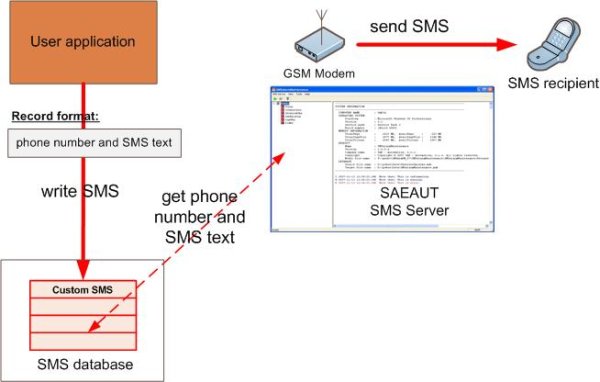
Abbildung 3: Verfahren zum Senden benutzerdefinierter SMS-Nachrichten
Verfahren zum Senden benutzerdefinierter SMS-Nachrichten
- User-Anwendung fügt einen neuen Datensatz in Datenbank für das Senden von SMS. Dieser Rekord hat zwei Eingänge enthalten:
- Recipient Telefonnummer (in separaten Spalte)
- Text der SMS-Nachricht (in separaten Spalte)
- Wenn SMS Server einen neuen Rekord in der Datenbank erkennt, nimmt die aus dem Datenbank.
- Eine SMS wird basierend auf den Daten erstellt und an die angegebene Telefonnummer über angeschlossene GSM-Modem gesendet.
Empfangen von SMS
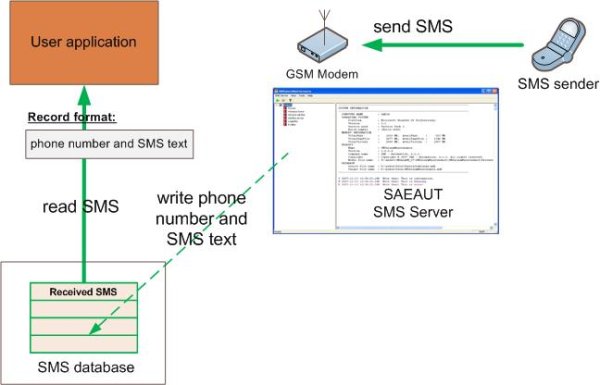
Abbildung 4: Verfahren für SMS-Nachrichten empfangen
Empfange SMS-Nachricht
- Wenn SMS Server eine SMS erhält, werden diese Daten in der Tabelle empfangenen SMS aufgezeichnet.
- Wenn die Client-Anwendung erkennt, dass die Tabelle SMS erhalten einen neuen Rekord, wählen Sie die gewünschten Daten (Telefonnummer, SMS).