




 SAEAUT SNMP OPC Server
Control and monitoring of network and other devices, integration into your SCADA

Downloads:
Current version overview:


Exploitation of SAEAUT SNMP OPC Server
The common way for managing industrial and network devices is to run an SNMP manager on a workstation while an SNMP agent runs on the devices themselves. In order to be able to integrate the network management into various HMI and SCADA systems with implemented OPC clients, it can be useful to incorporate an SNMP manager into the OPC server application. SAEAUT SNMP OPC Server provides such solution.
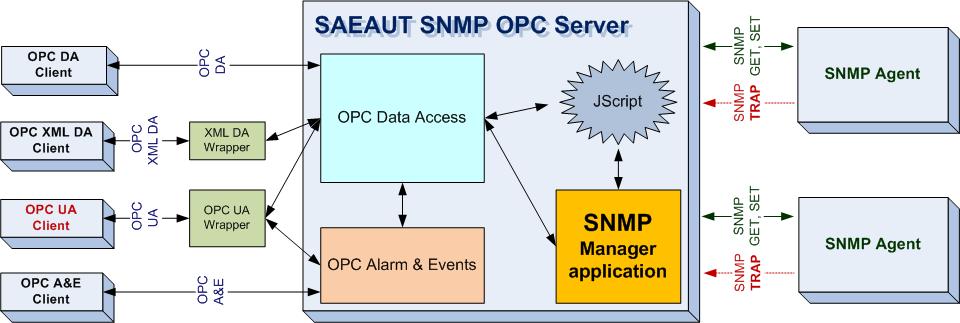
The SAEAUT SNMP OPC Server features
- From an SNMP point of view, it acts as a Network Management System
- Implemented protocols SNMPv2c and SNMPv1
- Implemented specifications OPC DA (Data Access) 3.0, 2.05, 1.0, OPC AE (Alarms and Events) 1.10
- The installation package contains an OPC UA 1.01 wrapper that allows you to access all the data from SAEAUT SNMP OPC server even via the latest OPC standard called Unified Architecture (UA)
- The installation package contains an OPC XML DA 1.01 wrapper which offers another way of communicating with the SAEAUT SNMP OPC server through Web Services
- Manages and monitors an unlimited number of devices with SNMP agents **
- The installation package contains a simple example of a running DEMO configuration
- Ability to define tags by using object identification (OID) from MIB file e.g.: .1.3.6.1.4.1.2681.1.2.102
- Supports standard SNMP commands GET and SET
- Built-in MIB Browser (on-line) sends requests to SNMP manageable devices to get SNMP variables which correspond to objects in the MIB database, providing the user with object IDs, data types and values ***
- Built-in MIB Browser (Offline) for browsing SNMP variables from MIB files, provided with SNMP device ****
- Ability to manipulate the acquired data by using JScripts which can be configured directly in the SNMP OPC server *
- IP Scanner module for scanning of computer networks in a given IP range, in order to find connected SNMP devices *
- Allows receival of SNMP TRAP, notification message from SNMP Agents
- Logging of server events *
- Configuration can be done in user friendly configuration software
- Allows you to obtain information about manageable and unmanageable network devices through standard Ping command
- Provides the Heartbeat functionality for monitoring devices which do not include SNMP Agents. This function shows the response time of a device as a special OPC variable
- Find tool, which allows you to search for a text within the current configuration and immediately browse the occurences in user friendly views
- Contains examples of OPC clients together with source codes in C# .NET, VB. NET, VB6
- Import from CSV files - reading OID and other information from CSV files
- Running as Windows NT Service if required ****
* These modules are available only in Enhanced and Professional versions.
** Basic version has limited number of the devices(15), which can be connected to the server.
*** Basic version includes MIB Browser but without the possibility
to add new items to configuration.
**** Available only in Professional version.
How to use SAEAUT SNMP OPC Server?
SAEAUT SNMP OPC Server allows operators to retrieve information from devices that make up the communication computer network about their status. This information can then be used by the operator to diagnose network or system problems.
SAEAUT SNMP OPC Server has implemented the latest OPC DA 3.0 specification. OPC XML DA and OPC UA enable clients to communicate with the server using web services.
Not all network devices are SNMP manageable. SAEAUT SNMP OPC Server can also configure OPC tags for such devices that are defined as heartbeat and can record the response time of the device. This SAEAUT SNMP OPC Server property allows you to obtain basic status information about non-manageable devices as well.
Managed SNMP devices can also send data to management applications without their request - traps (for example, when changing values), which reduces communication requirements between the SNMP agent and the SNMP manager. SAEAUT SNMP OPC Server supports data capture using these traps.
Actual values of the variables, about the status of network devices, can be further processed in the SAEAUT SNMP OPC Server by using JScripts. The SAEAUT SNMP OPC Server itself allows you to configure and run these scripts with a built-in simple editor, giving the user the ability to perform pre-processing of data in the SAEAUT SNMP OPC Server.
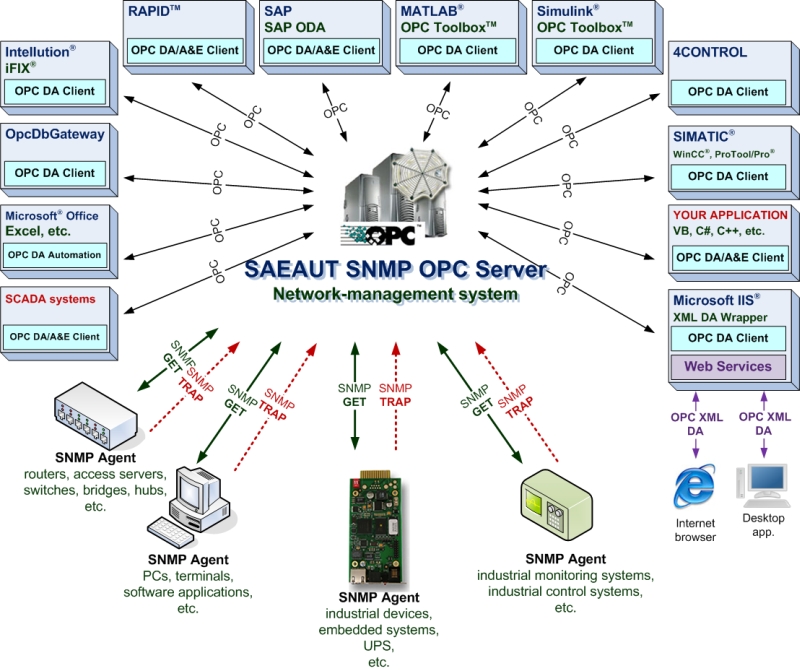
The main components of SAEAUT SNMP OPC Server
- Configuration tool
- Runtime application
- OPC UA wrapper
- OPC XML DA wrapper
- OPC DA 3.0 Test client (including the source codes in VB.NET and VB 6.0)
- Test client that communicates with SNMP OPC server through Web Services
- Electronic manual (English version)
In order to fulfill the various demands of customers, the SAEAUT SNMP OPC Server is available in three editions: SAEAUT SNMP OPC Server Basic , SAEAUT SNMP OPC Server Enhanced and SAEAUT SNMP OPC Server Professional. The differences are shown in the following table:
| SAEAUT SNMP OPC Server | Basic | Enhanced | Professional |
|---|---|---|---|
| SNMPv2c, SNMPv1 |

|
|
|
| OPC DA 3.0, 2.05, 1.0 |
|
|
|
| OPC AE 1.10 (Alarm management) |
|
|
|
| OPC UA 1.01 wrapper |

|
|
|
| OPC XML DA 1.01 wrapper |
|
|
|
| Configuration tool |
|
|
|
| Built-in Monitoring client in configuration tool |
|
|
|
| Max. number of connected devices | 15 | unlimited | unlimited |
| MIB Browser (On-line) | (without an option to add new items) |
(full-featured)
|
(full-featured)
|
| MIB Browser (Offline) |
|
|
|
| SNMP GET/SET operations called from the configuration tool |
|
|
|
| JScripts - possibility to use scripting |
|
|
|
| IP Scanner |
|
|
|
| Logging of events to file |
|
|
|
| Find tool |
|
|
|
| SAEAUT SNMP Agent |
|
|
|
| SAEAUT SNMP OPC Client |
|
|
|
| OPC Client applications source code |
|
|
|
| Import from CSV file |
|
|
|
| Installing as Windows NT Service |
|
|
|
| With SAEAUT OPC WebView |
|
|
|
Configuration tool
The configuration tool is an application with a GUI. It is used to configure the address space of the SNMP OPC Server within a tree view containing managed and unmanaged devices, their variables (OPC items used for mapping of SNMP variables), alarms and simulation signals. It also contains a JScript editor to create scripts for preprocessing of OPC items.

List of data items in the SAEAUT SNMP OPC Server Configurator.
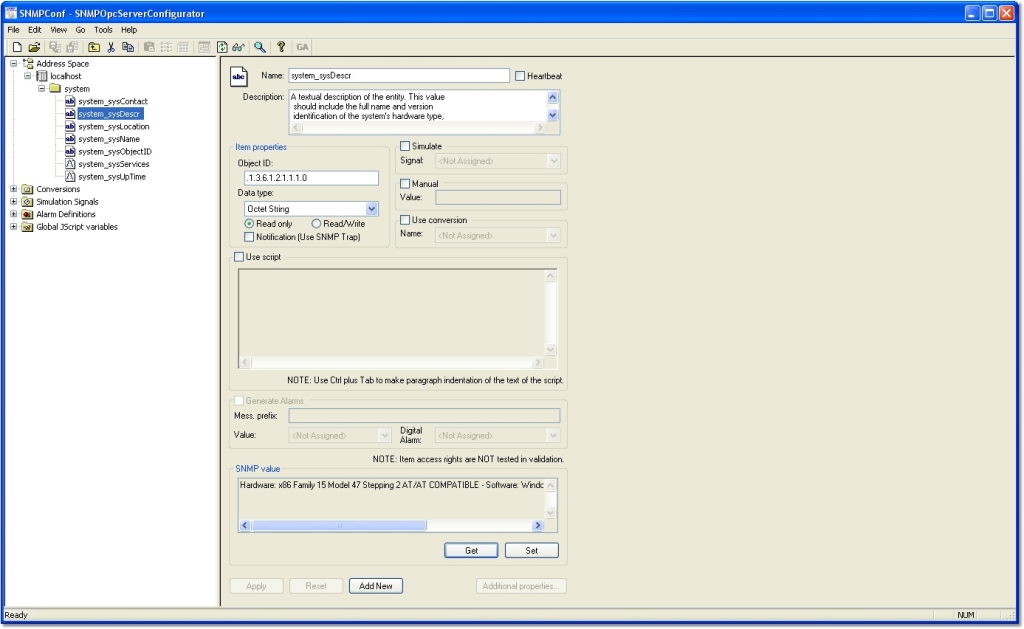
Detail of a data item in the SAEAUT SNMP OPC Server Configurator.
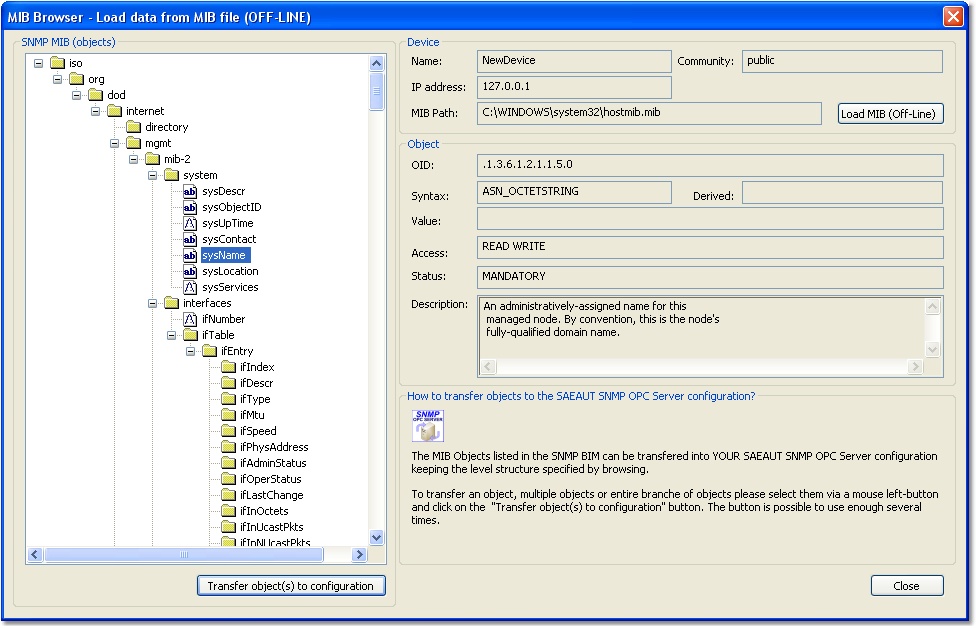
Off-Line MIB browser in the SAEAUT SNMP OPC Server Configurator.
Monitoring client
The monitoring client is part of the configurator. It's able to monitor network devices and provide information about parameters selectable by a user. This information is displayed in well-arranged tables which contain not only the value itself, but also other useful information such as timestamps and quality of connection.
Alarm administration
The built-in alarm system allows users to configure how critical values will be displayed by the server, using predefined alarm messages.
JScripts
SAEAUT SNMP OPC Server allows you to further process data obtained from SNMP agents using J-Scripts. The server offers a simple built-in editor where the scripts can be modified and executed. This allows users to preprocess data on the server side before they are provided to clients.
MIB Browser
SNMP variables received through SNMP protocol actually represent objects in the MIB database. The MIB database is comprised of attributes (MIB objects) which can be used for the configuration, management and analysis of SNMP manageable devices. Each MIB object is identified by its ID. The main task of the MIB browser is to request applicable IDs of MIB objects.
Besides standard online browsing features, MIB Browser provides Offline MIB browsing (note that this feature is available only in Enhanced and Professional editions). This is achieved by loading the information about SNMP variables from the MIB file, which is usually delivered together with the SNMP device.
IP Scanner
This module provides the feature of scanning computer networks in a given IP range in order to find connected SNMP devices. After completing this process, all search results (IPs with SNMP devices) are available in the device panel so that the user can later select valid SNMP address' from this list.
SAEAUT SNMP OPC Client
A simple OPC client which allows you to connect to SAEAUT SNMP OPC Server through standard interfaces DA 3.0, 2.05, and XML-DA 1.01. To simplify the process of connecting to the server, the client already contains predefined links for the most typical connection methods.
OPC Client applications source code
As well as the above mentioned SAEAUT SNMP OPC Client, the installation package contains several example client applications, demonstrating the easy use of SAEAUT SNMP OPC Server and providing a very good source of inspiration for the user.
Events logging
The purpose of event logging is to record the occurrence of significant events of SAEAUT SNMP OPC Server. The events are stored in a log file so it’s possible to check and analyze them later on.
Find tool
SAEAUT SNMP OPC Server is able to manage and monitor very complex network configurations. In such cases you'll appreciate the Find tool, which allows you to search for a text within current configuration and immediately browse the search results in user friendly views
The review of SAEAUT SNMP OPC Server was published by 3d2f.com software directory, and was rated as the best product in its class.
The whole article can be found here It has also gained many awards on different software portals.
TECHNICAL INFORMATION
For more information about OPC Data Access and OPC AE interfaces support, see the document SAEAUT SNMP OPC Server - Technical Information
SAEAUT SNMP Agent version 1.01.00 (FREE) - Solution for simulating SNMP devices.
We present a new product called SAEAUT SNMP Agent (version 1.01.00). If you need to simulate SNMP devices or generate SNMP Trap messages, this software is the right choice for you.
For more details to use it, you can download SAEAUT SNMP Agent - User's Guide.
To download the software use the following link http://www.saeautom.sk/download/products/snmpagent/saeaut-snmp-agent.zip

OPC Foundation Certified for Compliance logo.
OPC Foundation Certified for Compliance logo is a trademark of the OPC Foundation and may be used only by written permission of the OPC Foundation. Any unauthorized use of the Certified for Compliance logo is prohibited. OPC Foundation Certified for Compliance logo indicates that this product has been tested by an independent certification lab and certified to be compliant with the following OPC Specifications: Data Access 2.05a Data Access 3.0 Additional information about compliance testing, logo program and a summary of test results can be found at www.opcfoundation.org for: SAEAUT SNMP OPC Server 2.12.01

OPC Foundation Self‐Tested for Compliance logo.
Statement of OPC Specifications Tested for Compliance for use with Self Compliance Logo::
OPC Foundation Self‐Tested for Compliance logo is a trademark of the OPC Foundation and may be used
only by written permission
of the OPC Foundation. Any unauthorized use of the Self‐Tested for
Compliance logo is prohibited.
OPC Foundation Self‐Tested for Compliance logo indicates that this product has been tested by the
manufacturer
to be compliant with the following OPC Specifications:
Data Access 2.05a
Data Access 3.00
Alarm & Event 1.02
XMLDA 1.0