




 SAEAUT SMS Service
sending and receiving SMS from/to various applications

For downloading:

Current version overview:

SAEAUT SMS Service is an application that allows other client applications to send and receive SMS messages.
It can be used for sending of information to customers, SMS marketing, managing of employees remotely, SMS voting, maintenance initialization, SMS tickets sending, the parking place and other services reservation and paying, resending e-mails as SMS, starting of various programes and scripts using SMS, etc.
SAEAUT SMS Service enables
- Sending and receiving SMS messages via devices with a GSM modem.
- Cooperation with other applications via shared database file.
The core functionality is provided by application without user interface implemented as Windows NT Service. All necessary settings are provided by delivered Configurator application which is also able to function as client application enabling editing and sending of SMS. The visually alike client application SAEAUT SMS Client is installable on other computers in the LAN. Another client application is SAEAUT SMS Web Client, which is accessible through the internet. Bundle of all three products delivered as SAEAUT SMS Server Professional is budget-priced alternative and a complex solution of the SMS communication in a company. It enables communication over GSM modem, web gateway, web services and shared database.
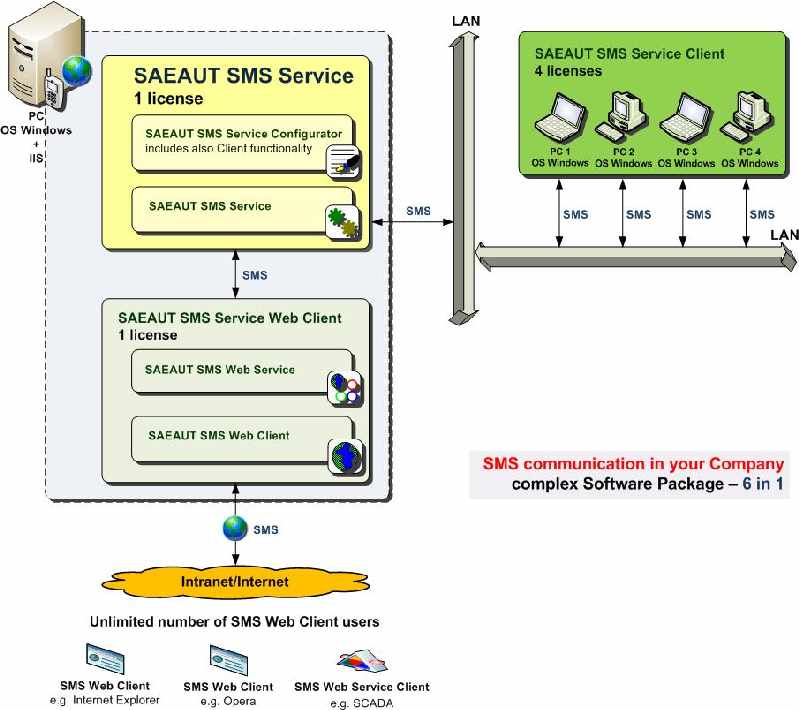
Software bundle SAEAUT SMS Server Professional. /click on this figure/
Main features of SAEAUT SMS Service
- Sending SMS message created and saved to the shared database by a client application.
- Sending SMS message to e-mail.
- Receiving SMS message and saving to the shared database for usage by client applications.
- It uses PDU format for message transfer to the GSM modem.
- It communicates with client applications using database file in MS Access format (other databases on demand).
- It is tested with couple of GSM modems (Huawai, FALCOM, Wavecom, Nokia, Sony Ericson, etc.)
- It is tested with various GSM services providers (Orange, T-Mobile, O2)
- Sorting of received SMS messages using regular expressions
Usage of SAEAUT SMS Service
Delivered software package (SMS server, Configurator, desktop client, example web application implemented in ASP.NET for MS IIS web server) can be used:
- As complete stand alone application for sending /receiving SMS using our example desktop from your computer or another computer in LAN.
- With our example web client application for writing SMS in web browser, sending it from your web server to the SMS recipient.
- With your client application which cooperates with SAEAUT SMS service.
- With another our applications OpcDbGateway and SAEAUT UNIVERSAL OPC Server for complex condition based SMS messaging.
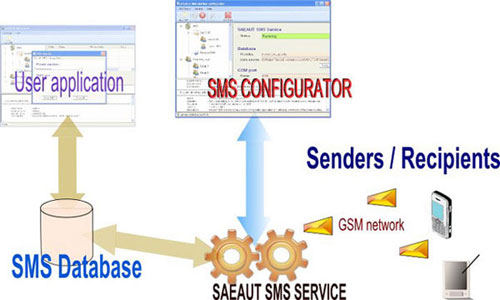
Usage of SAEAUT SMS Service for sending and receiving SMS messages. /click on this figure/
Sending SMS to a defined group of recipients
- The user sets desired configuration of the SMS service through the configuration application:
- Path to database
- Serial port of connected GSM modem
- SIM card specific settings
- E-mail server settings
- With the help of client application the user creates new SMS messages and stores it in the database. The SMS must contain:
- Recipient group number
- SMS message text
- SMS creation date
- Prefered delivery method
- If SAEAUT SMS Service finds a new SMS to send, it loads all recipients from the given group a checks prefered delivery method.
- When the SMS is ready for processing, it is sent to specified phone number(s).
- The delivery report/confirmation is stored in the database after the SMS is delivered.
- The operation results (sending, delivering of SMS) is written in the Event log and shown in the SMS Configurator window.
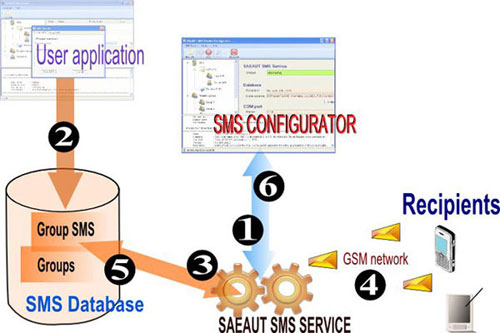
Usage of SAEAUT SMS Service for sending and receiving SMS messages for group of recipients. /click on this figure/
Sending SMS messages to a specified phone number
- The user sets desired configuration of the SMS service through the configuration application:
- Path to database
- Serial port of connected GSM modem
- SIM card specific settings
- E-mail server settings
- With the help of client application the user creates new SMS messages and stores it in the database. The SMS must contain:
- Recipient group number
- SMS message text
- SMS creation date
- If SAEAUT SMS Service finds a new SMS to send, it checks if it contains all required data.
- When the SMS is ready for processing, it is sent to specified phone number(s) or e-mail.
- The delivery report/confirmation is stored in the database after the SMS is delivered.
- The operation results (sending, delivering of SMS) is written in the Event log and shown in the SMS Configurator window.
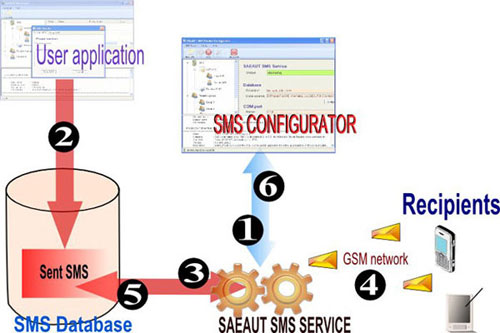
Sending SMS messages to a specific phone number with SAEAUT SMS Server Profesional. /click on this figure/
Receiving SMS messages
- The user sets desired configuration of the SMS service through the configuration application:
- Path to database
- Serial port of connected GSM modem
- SIM card specific settings
- SAEAUT SMS Service loads the SMS message from the GSM modem.
- Delivered SMS is stored in the database.
- The delivery report/confirmation is stored in the database after the SMS is delivered.
- The client application can import the SMS message and process it.
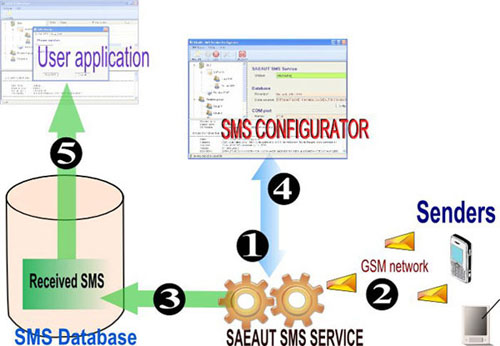
Receiving SMS messages with SAEAUT SMS Server Profesional. /click on this figure/
SMS client applications from SAE - Automation, s.r.o.
- SAEAUT SMS Service Client
- SAEAUT SMS Service Web Client
SMS OPC Server
Integration of applications SAEAUT SMS Service and SAEAUT UNIVERSAL OPC Server brings full functional SMS OPC Server, and integrating it with OpcDbGateway brings full functional SMS OPC Client/Server.