



 SPSPlusWin
case study
 User friendly Engineering-Software running under MS Windows 9x/NT/2000 software for designing of the visualisation projects using operator panels from the company SAE-STAHL GmbH.
Features:
- WYSIWYG (What You See Is What You Get)
- none programmer language or macros knowledge needed for creation of the visualisation project, project is created on on basis of choosing objects from the menu. The widespread online help is available
- online switching of up to four languages for each project
- Windows Explorer like tree structure of project objects
- project pictures can be created with powerful graphic editor of course with preview. Bitmaps can be imported and then scale and move
- variables and texts can be placed free in project pictures using of various display fonts
- generating and download project files to operator panels
- download fonts, communication drivers and system files to operator panels
- multiuser and multiproject tool for effective team work
SPSPlusWin was in the first phase developed for the class of visualisation panels. In next phases, there was enhancement for the class graphic and text panels implemented. On the enhancements of the using of SPSPlusWin for graphic and text panels has noticeable participation SAE - Automation.
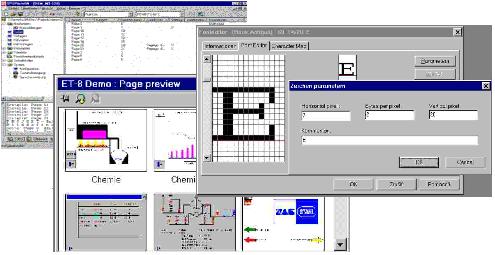
Participation on the SPSPlusWin development make possibility for us to offer for our customers superior user support and treating complete visualisation projects with operator panels from SAE - STAHL GmbH too.
SAE - Automation participated on the development in next parts:
- modification of the graphic user interface for projecting of graphic and text based operator panels
- conversion of project database generated by means of the SPSPlusG software to the SPSPlusWin format and reversal
- import of the projects stored in SPSPlusG format
- generation of the project files for graphic and text operator panels
- download of project files to operator panels
- comfortable project report printing generator including generation of references between project objects and WYSIWYG presentation of the picture objects
- editor for text based operator panels
- clippboard and Drag & Drop for transfer of objects within one or more projects for all types of operator panels
- font editor and font converter for creation of the user fonts and implementation of using of Windows TRUE-TYPE fonts in operator panels
- recipes sets creation for the text and graphic based panels
- the preview window for displaying of all pictures present in the project at once
- password securing of the project before download to the operator panel